IG Tracker
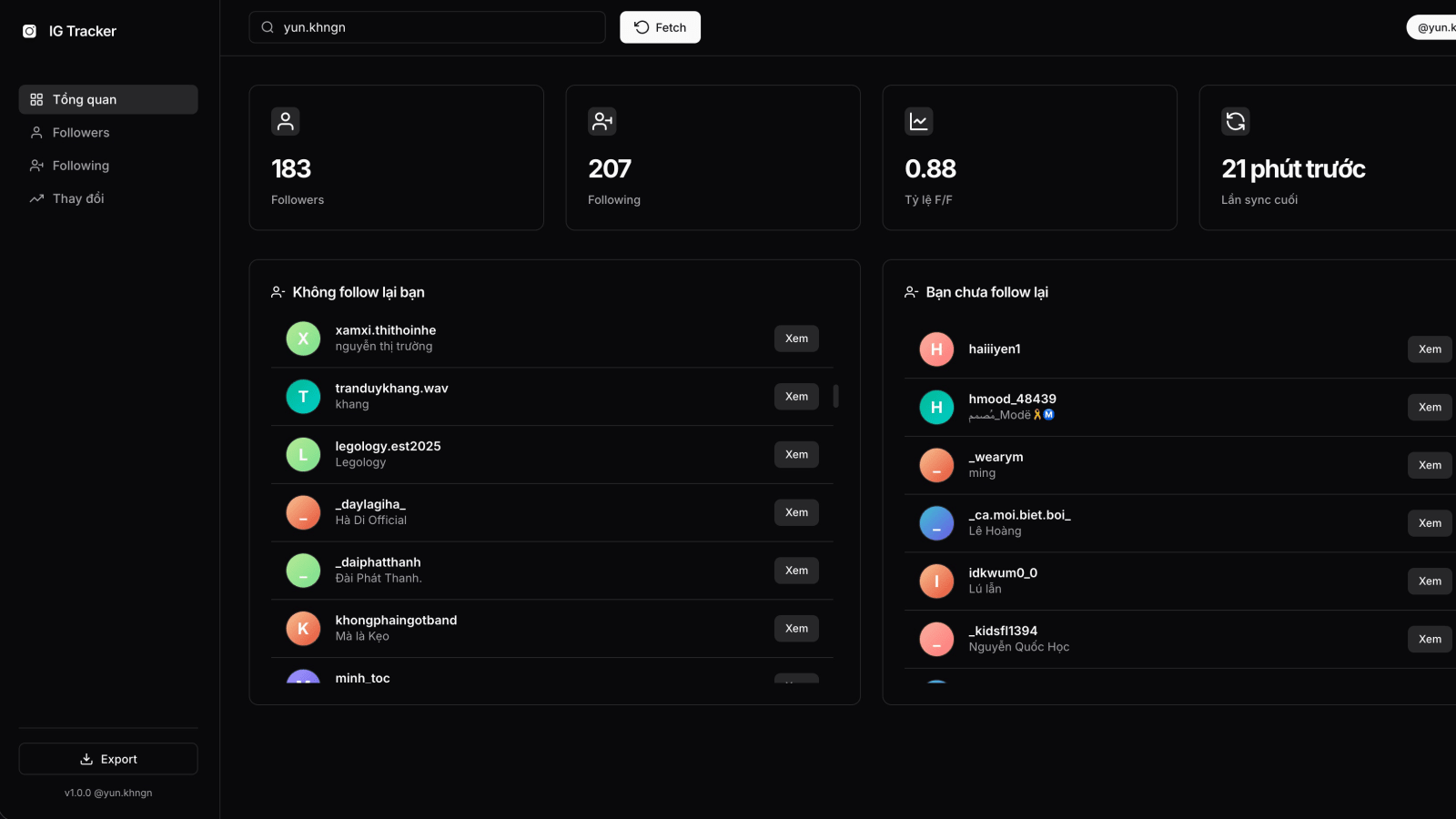
A powerful Chrome Extension to track your Instagram followers, following lists, and detect unfollowers, providing comprehensive insights directly from your browser.
Case study
Project Overview
The IG Tracker is a robust Chrome Extension designed to provide users with in-depth analytics regarding their Instagram followers and following lists. It addresses the need for a private, client-side tool to monitor changes in social media connections, specifically identifying unfollowers, users who don't follow back, and those not followed back. By operating directly within the browser, it ensures maximum privacy as all data is stored locally, offering an alternative to third-party services that might compromise user data.
Core Technologies and Their Fit
This project leverages the capabilities of Chrome Extension API, primarily using JavaScript for its core logic and interaction with the web page. The choice of a Chrome Extension is fundamental as it allows direct access to the user's browser session with Instagram, enabling client-side data fetching without requiring external server interactions. Local Storage, specifically chrome.storage.local, is critical for securely and privately persisting all tracking data, snapshots, and analytics directly on the user's device. This technology stack is perfectly suited for a privacy-focused tool that needs to interact with web content and maintain state across browser sessions.
Key Features
Dashboard Overview: Provides an instant summary of total followers, following count, and follow ratio.
Insightful Analysis: Identifies users you follow who do not follow you back (Not Following Back) and users who follow you that you do not follow back (Not Followed Back).
Change Tracking: Automatically detects and logs changes in your follower and following lists between scans.
Local Data Storage: All data is stored exclusively on your device, ensuring privacy and control.
Data Export: Allows users to export their tracking history in JSON format.
Multi-account Support: Capable of tracking statistics for multiple Instagram accounts simultaneously.
Technical Challenges
Developing IG Tracker involved navigating several technical hurdles. A primary challenge was reliably extracting dynamic data from Instagram's web interface, which often involves handling JavaScript-rendered content and adapting to potential changes in the platform's HTML structure. Efficiently managing and querying potentially large datasets of followers and following lists within chrome.storage.local required careful consideration of data structures and asynchronous operations. Implementing a robust change detection algorithm to accurately identify gained and lost connections between data snapshots, alongside supporting multi-account tracking, added significant complexity to the core logic. Finally, ensuring a smooth user experience while performing potentially time-consuming data fetches and processing was also key.
What I Learned
Deepened understanding of the Chrome Extension lifecycle, manifest configuration, and content script interaction with web pages.
Techniques for client-side data scraping from dynamic web content using JavaScript and DOM manipulation.
Effective strategies for utilizing
chrome.storage.localfor persistent, private, and structured data storage within a browser environment.Designing intuitive user interfaces and dashboards for presenting complex data insights within the constraints of an extension popup or dedicated page.
Approaches to handling asynchronous operations and managing state in a data-intensive browser extension.
Complexity Label: Intermediate
This project is classified as Intermediate. While the fundamental concept of a Chrome Extension can be accessible to beginners, IG Tracker involves several features that push beyond basic extension development. The need for client-side data scraping from a dynamic website, robust local data management for tracking changes over time, and supporting multiple accounts introduces significant logical and architectural challenges. The implementation requires a solid grasp of JavaScript, asynchronous programming, and careful consideration of data persistence and user experience within the browser extension ecosystem.
Keep exploring
Related work
From the journal


Next project
Planning Poker →